Filling several shifts at once (grouped requests)
Goal: "How do I fill all the open shifts for this coming weekend?" Send one request, let each caregiver pick from the shifts that fit them, and assign as replies come in.
Where: Requests (or Home / Calendar) → New grouped request
Quick paths
| I want to… | Do this |
|---|---|
| Fill every open shift this weekend, across all clients | New grouped request → Select by Dates → Sat–Sun → Initiate Caregiver Finder |
| Fill a new client's first week | Select by Client → Select Schedule (define the times) |
| Fill one client's remaining open shifts | Select by Client → Current Open Shifts |
| A caregiver called out of several shifts | From the callout → Create grouped request |
| Do this automatically every week | Recurring workflows → Future Open Shifts |
| Send the remaining open shifts back out | Reopen grouped request |
Walkthrough: fill this weekend's open shifts
- Open New grouped request and choose Select by Dates.
- Set Shifts from: Saturday and Until EOD of: Sunday.
- Types: Only Open Shifts, or Open & Cancelled by CG to include shifts caregivers dropped.
- (Optional) Location filter to work one office or region at a time.
- Uncheck any shifts you don't want to include.
- (Optional) Offer as: the CareQB line to text from.
- Click Initiate Caregiver Finder.
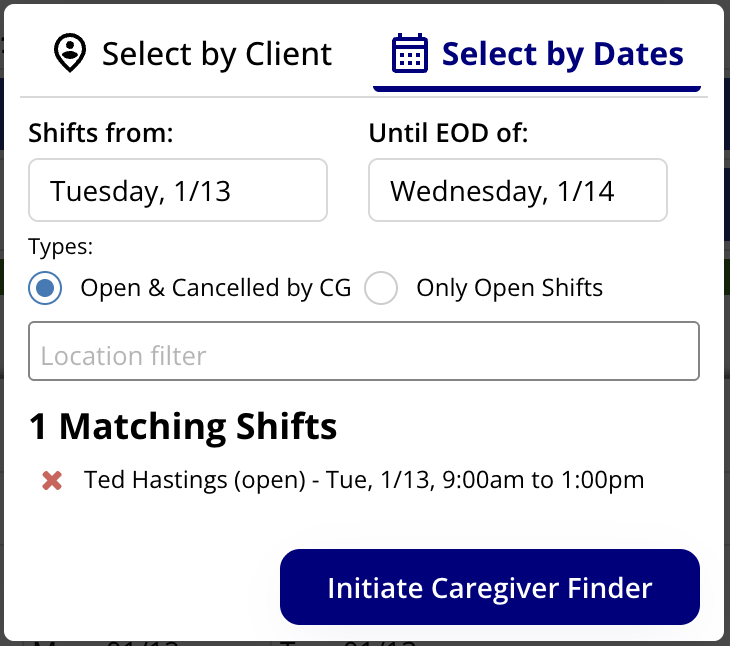
More than 10 shifts? CareQB suggests splitting the date range. Shorter lists are easier for caregivers to read and reply to. This is a suggestion, not a requirement.
How each caregiver's message is built
The message contains {{shift_list}}, which CareQB replaces with only the shifts that caregiver is eligible for, based on skills, distance, schedule, and availability. A caregiver free Saturday but not Sunday sees only Saturday.
Across several clients, CareQB adds a short line for each client, for example > Client A: Riverside, has cats. Clients drop off the list for caregivers with no eligible shifts with them. You can add detail to any client's line, but keep it on one line (don't press Enter) so CareQB can filter it.
For one client, you can write:
- General msg: for everyone. Describe the client's location and needs.
- Best match: a shorter version for caregivers who know the client. Leave it blank to send the general message to everyone.
Choose who's asked
- For a single client, caregivers appear as primary or secondary for each shift. Multi-client requests show one eligible list.
- Caregivers matching any shift vs. Caregivers for ALL shifts: turn on All-match required if you need one person to cover everything. If nobody matches all of them, CareQB tells you and leaves the list unchanged.
- Search to add caregivers. They're only added to shifts without conflicts on their schedule or availability.
- Initiate request with: Primaries only or Both lists, then Send requests.
Escalate later: Pre-schedule escalation to secondaries? with Send in:, or click Escalate now. Pending caregivers also get an automatic nudge.
Assign and keep everyone updated
- Caregivers can accept or decline individual shifts.
- You decide who gets each shift. CareQB never auto-assigns grouped requests, even to best matches.
- When you assign a shift, CareQB marks it filled, pushes it to your scheduling software (if supported), and updates everyone else's list of what's still open.
- Send message to remaining eligible caregivers for updates or bonuses. It skips anyone who already accepted, asked a question, or declined.
Closing or reopening
- Cancel with remaining caregivers (with a message), Cancel request (w/ no msg), or mark Client doesn't need fill-ins to resolve the unfilled shifts.
- Reopen grouped request: choose which shifts go back out. Filled shifts are off by default, shifts filled since on the schedule are excluded, and shifts that have already ended can't be reopened.
- Detach & reopen pulls one shift out to handle on its own.
Tips
- Run it Thursday for the weekend, or let a recurring workflow do it every week.
- Use the location filter for multi-office agencies, so caregivers aren't offered shifts across town.
- Watch progress on the Requests tab under Active grouped requests.